Unmasking the Broadcast Storm: Exposing the Impact of AS133301's VLAN Mismanagement

Background
Note: The ISP in discussion here is AS133301 - DWAN.
On 22nd March 2024 around 8:00 PM, I started noticing packet loss on my internet. I was clueless on why it was happening and that’s when I realized Indian Premier League (IPL) has started and it was RCB vs CSK playing that day. I assumed that my ISP was unable to handle the traffic from IPL live streams. It came to a situation where I was not able to use internet for even browsing by 9:00 PM. I registered a complaint with a senior engineer and promptly I was told that there is no bandwidth related issues. I shared some MTR results to multiple endpoints (Google, Meta, Cloudflare, etc.). They said they would need a day or two to check if there is any issue in the network path.
I followed up the next day and they confirmed that there was no issue at the their end. I was also told that they would need to check with the LCO (Local Cable Operator) for any issues at the OLT. I was also given a hint by them that it could be an issue of broadcast packet filling up.
Now for the readers who don’t know what LCOs are, Local Cable Operators (LCO) are partners of Telcos/ISPs who take care of the last-mile connectivity. In Tier 2 and Tier 3 cities, where it is not feasible for Telcos/ISPs to control the last-mile, they get into a partnership with LCOs (mostly Cable TV operators in the area). They take care of OLT deployment, laying and maintenance of last-mile fiber cables.
Suspecting a BUM Issue from Rx Stats
Through conversations with acquaintances who have faced similar issues, I had seen them share screenshots of their interface Rx stats, which revealed abnormally high Rx rates. Reflecting on these discussions, I decided to inspect Rx stats on my WAN interface to see if I could spot any anomalies. Sure enough, these levels seemed unusually high, promoting me to dig deeper.
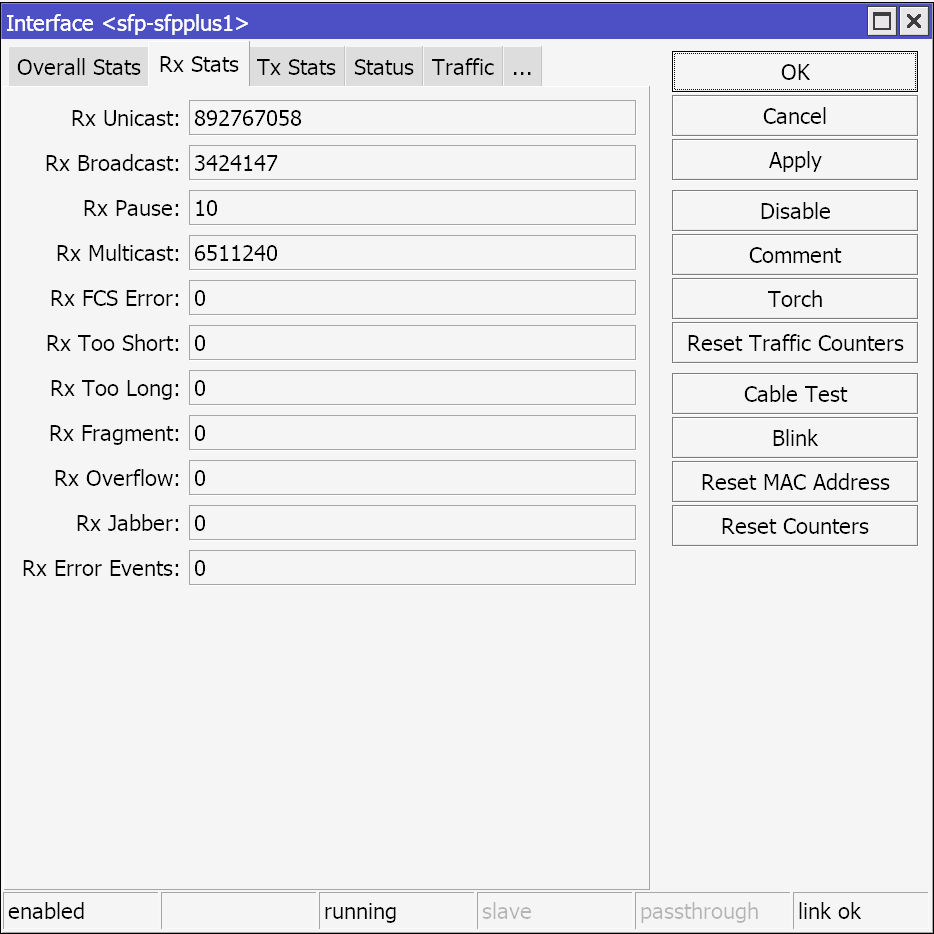 Rx Stats
Digging Deeper into the Issue
I recently switched out my router to a Mikrotik RB5009UPr+S+IN. As a part of learning how RouterOS works, I was going through different monitoring options built into RouterOS and I found a tool called Torch under my SFP+ interface where fiber from LCO terminate at.
Monitoring Traffic with Mikrotik Torch
Mikrotik’s Torch tool is a network monitoring tool that allows users to visualize real-time traffic passing through an interface. It categorizes into Ethertype, Protocol, Source Address, Destination Address, VLAN ID, DSCP, Tx Rate and Rx Rate.
I was seeing traffic of four different Ethertypes:
- 8863 - PPP over Ethernet (PPPoE) Discovery Stage
- 8864 - PPP over Ethernet (PPPoE) Session Stage
- 86DD - Internet Protocol version 6 (IPv6)
- 9088 - Unknown
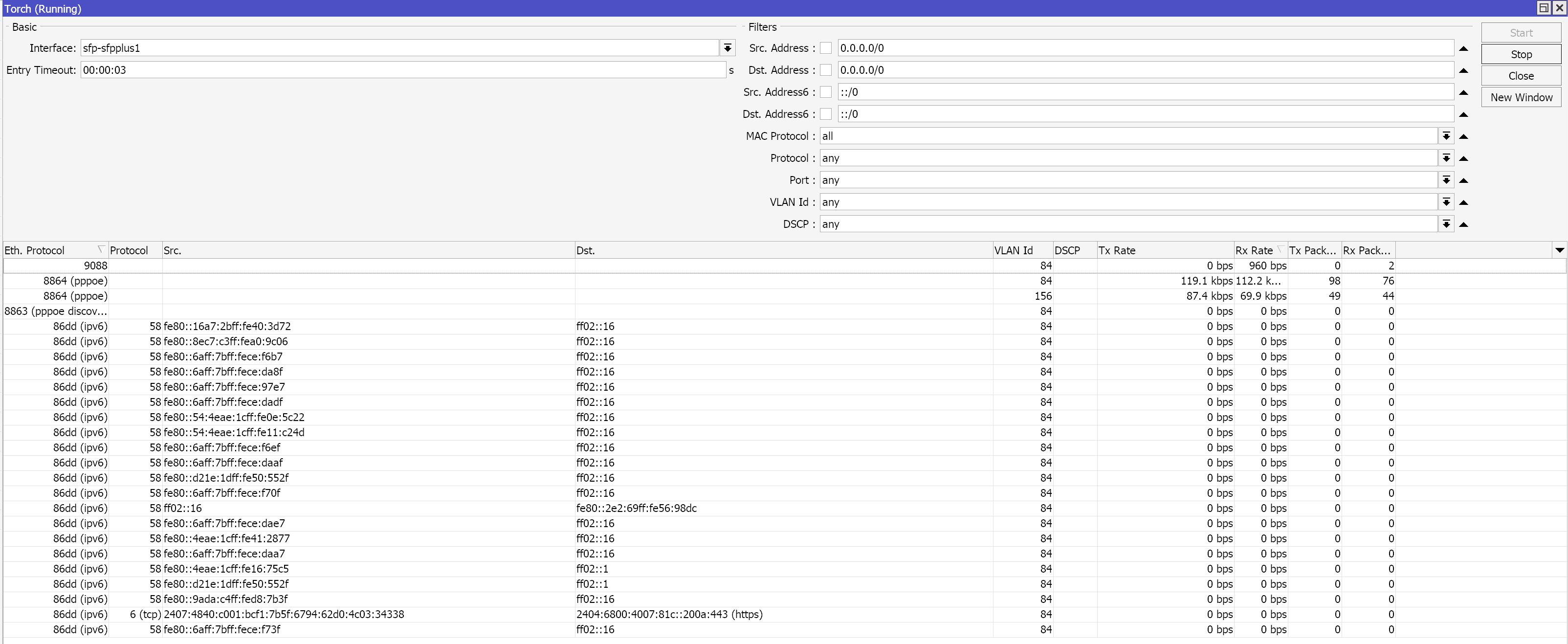 Running torch on WAN
Here, only PPPoE Session Stage makes sense and I was not supposed to see any other traffic. Also, what is 9088? I cross-checked with IANA 802 Numbers and could not find 9088 listed. Apparently, broadcast frames shows up with the protocol as 0x9088, which is unknown.
This is when I decided to do a packet capture so that I can understand the issue in-depth. I used another in-built RouterOS tool called Packet Sniffer and captured packets for 5 minutes. I exported it to my laptop and used wireshark to look at the packets.
Observations from Packet Analysis:
Broadcast Frames: The PCAP contains several frames where the destination MAC address is
ff:ff:ff:ff:ff:ff, which indicates they are broadcast frames.PPPoE Discovery Frames: PPPoE Active Discovery Initiation (PADI) frames, which are a part of the PPPoE protocol used for establishing PPP sessions but the MAC address of the devices indicate that they do not belong to me.
ARP Request Frame: Address Resolution Protocol (ARP) request, where device with the MAC address
NetlinkIct_56:c6:46is trying to resolve the MAC address for the IP address49.44.57.164and inform the device at IP address192.168.1.1.IPv6 SYN Packets: The PCAP also contains several TCP SYN packets with IPv6 source and destination addresses. This indicates that even though IPv6 being disabled on my end, there is still IPv6 network traffic being generated and captured. The destination IPv6 address belong to
2404:6800:4007:817::200a, which belongs toAS15169 Google. These frames show the MAC addresses of the communicating devices, which includeSaiNXTTechno_13:dd:bc,MotorolaMobi_0a:6f:19, andHuaweiTechno_92:1d:9f. These are devices from different manufacturers and vendors which I do not own.IPv6 Multicast Frames: The PCAP contains IPv6 multicast frames, targeting the multicast groups
ff02::1(all-nodes multicast) andff02::16(MLDv2 multicast listener report). The source IPv6 addresses are local-link addresses(fe80::), while the destination are multicast addresses. MAC addresses of the communicating devices includeSaiNXTTechno_2a:4d:95andNetlinkIct_a0:9c:06, which are cheap Chinese ONT Combo Units.IPv6 Router Advertisement (RA) Messages: These are periodic IPv6 router advertisement messages sent out by routers to advertise their presence and provide configuration information to hosts on the local network. Frames are sent from link-local IPv6 address
fe80::1to the multicast addressff02::1, which s the all-nodes multicast address used for delivering RAs.
Potential Performance, Security and Privacy Risks
Seeing traffic from other devices or networks on your WAN interface can have significant implications for network performance, in addition to security and privacy concerns.
The presence of broadcast frames and multicast traffic from other devices that do not belong to you can consume significant bandwidth and processing resource, leading to performance degradation and potential network congestion.
Processing and filtering the unwanted traffic from other devices can result in higher CPU and memory utilization. This also can lead to performance degradation, especially in resource-constrained environments or during periods of high network utilization.
If the volume of unwanted traffic from other devices is significant, it can contribute to network congestion, causing packet loss, increased latency, and reduced throughput for your legitimate network traffic.
The presence of such traffic indicates that you are not isolated from other customers due to the lack of VLAN isolation or Client isolation by the ISP. This exposure not only violates the privacy expectations of other customers but also puts your network at a risk of potential security threats, such as denial-of-service attacks or broadcast-based exploits.
Without proper isolation mechanisms in place, your network traffic is essentially part of a larger shared broadcast domain, exposing you to potential security risks and violating the privacy of other customers.
This situation is considered bad from a security and privacy perspective, as it goes against best practices and industry standards for network isolation and customer protection.
Addressing the Issue
The issue of seeing traffic from other devices or networks on your WAN interface can be averted using Q-in-Q (IEEE 802.1ad) technology. Q-in-Q, also known as Double VLAN Tagging or VLAN Stacking, allows service providers to create multiple logical networks over a single physical network infrastructure, ensuring complete traffic separation between customers. With Q-in-Q, each customer’s traffic is assigned a unique VLAN ID (C-VLAN or Customer VLAN). The service provider then encapsulates this C-VLAN with an additional outer VLAN tag (S-VLAN or Service VLAN) on their network infrastructure. This double VLAN tagging effectively isolates each customer’s traffic, preventing it from being seen or accessed by other customers, even if they are using the same physical network infrastructure.
Also, OLTs can assign each customer or subscriber to a separate VLAN, effectively isolating their traffic from other customers on the same OLT. This is similar to the VLAN isolation concept used in traditional Ethernet networks but implemented at the OLT level.
How a Broadcast Storm can bring down a Network?
A broadcast storm is a situation where a network becomes overwhelmed with an excesive amount of broadcast traffic, leading to significant performance degradation and potential network congestion or even outages. In the context of the observed issue with the lack of VLAN isolation, the presence of broadcast frames from other devices on the network can potentially escalate into a broadcast storm scenario if a customer on the network decides to generate uncontrolled broadcast traffic.
Here’s how the lack of proper network isolation can exacerbate the impact of a broadcast storm:
Propagation of Broadcast Traffic: Without VLAN isolation, broadcast traffic from a single customer can propagate across the entire network, affecting all other customers connected to the same broadcast domain.
Amplification Effect: As the broadcast traffic from the offending customer reaches other devices, those devices may respond with their own broadcast frames, further amplifying the volume of the broadcast traffic on the network.
Service Disruption: A broadcast storm can effectively halt legitimate communication, resulting in widespread service disruption for all customers on the same network.
ISP’s Response and Handling
Well in short, NOTHING. I reported this issue on 27 March 2024. I sent them multiple detailed message which included a detailed report on my observations and relevant PCAP files that supports my claims. All of my messages were seen within a day or two. Apart from this, I have called up their customer support multiple times, who didn’t even have a clue about BUM. I was never given a ticket ID for my issue, so everytime I called them, I had to explain my issue in detail. One time, I was immediately demanded remote access to my computer so that they could check the issue, which I obviously denied. I sensed the support associate getting hostile after I denied him remote access. This shows poor customer service training he received as my common-sense could not understand why someone would demand remote access to my system given that ISPs have other measures to monitor and troubleshoot their network. I could see that call not getting anywhere but I tried pushing my luck and that’s when he asked me about the modem I use. Yes, MODEM, in a PON network. That is when I decided to make peace with my ISPs incompetency and refrain from pursuing this issue anymore.
As of 23 April 2024, I have not received any reply from them even after trying to follow-up multiple times. This lack of response does not surprise me. From what I have heard from multiple acquaintances of mine, this issue is more common than you think, especially with small to medium size ISPs in India.
Conclusion
I believe the primary cause of packet loss during IPL streams could be the lack of VLAN isolation by the ISP has led to significant performance degradation and the potential for network congestion. This situation violates industry best practices and standards for network isolation and customer protection.
While technologies like Q-in-Q (IEEE 802.1ad) and proper VLAN isolation at the OLT level exist to mitigate these problems, the ISP’s lack of response and inaction raises concerns about their commitment to addressing this problem.
One potential reason for this situation, particularly in the Indian context, could be the prevalence of cheap internet services. In an effort to offer affordable internet plans, some ISPs, especially smaller or medium-sized ones, may cut corners or neglect to implement proper techniques due to cost considerations or lack of knowledge about best practices.
The abundance of low-cost internet options in India has led to highly competitive market, where some ISPs prioritize price over quality of service. Additionally, there may be knowledge gaps or a lack of expertise among these ISPs.